Radio Manager

No credit card required

Back to the guide Guide

External stream relay

Rebroadcasting another stream on your station

What is "External stream relay" for?

A relay allows your radio station to broadcast another station's stream, either continuously or only during specific time slots. Your station then takes the audio from the other station and rebroadcasts it to your listeners, in place of your local programming.

Common use cases include: picking up a partner station's morning show, relaying a national station overnight, or covering a time slot with no live presenter.

You can find this page in the "Tools" > "Stream relay" menu.

Good to know: A radio station must be installed. Otherwise the page displays "You do not have a radio station installed yet. The relay will be available once your station is online." For a team member, the menu entry only appears with the "Programming" permission.
The radio selector, relay status and the
The radio selector, relay status and the "Add a relay" button Click to enlarge
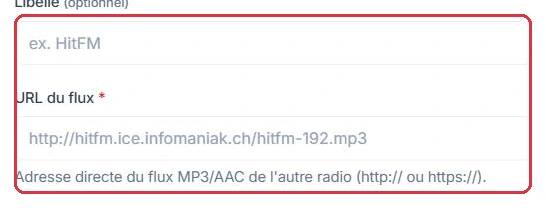
The optional label and the URL of the stream to relay
The optional label and the URL of the stream to relay Click to enlarge

Adding a relay

First select the relevant station from the "Radio" list, then click "Add a relay". The window asks for:

  • "Label" — optional, 120 characters maximum. This is the name you will see in the table. If you leave it blank, the domain name of the stream is used automatically.
  • "Stream URL" — required. This is the direct address of the other station's MP3 or AAC stream, beginning with http:// or https://, 500 characters maximum.
Example

Radio Soleil has signed an agreement with a partner station to carry its morning show. It creates the relay using just two fields:

  • "Label" → Matinale HitFM
  • "Stream URL" → https://stream.exemple-hitfm.fr:8000/hitfm.mp3 (fictitious address)

The address was verified beforehand: pasted into an audio player, it plays the station's audio directly. If the label had been left blank, the table would display stream.exemple-hitfm.fr.

Why: a clear label lets you identify the relay in the table and in the "On relay: …" badge. A web page URL entered instead of the stream URL will pass validation but produce only silence on air.

Tip: Be careful not to paste the address of the other station's web player page: you need the address of the stream itself, the one that plays directly in an audio player. A page address will return silence.

Continuous or scheduled slots

The "Broadcast" option offers two modes:

  • "Continuously" — the relay is a candidate for broadcast around the clock, 24/7.
  • "On scheduled slots" — the relay only takes over the station during the days and times you define. This is the default mode.

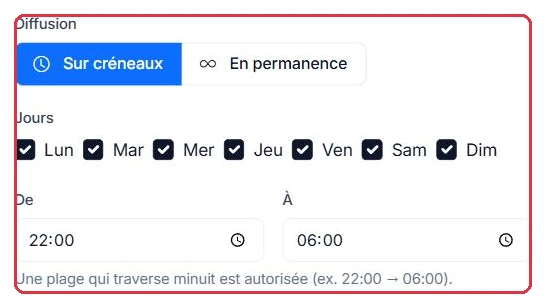
In "On scheduled slots" mode, you tick the "Days" ("Mon", "Tue", "Wed", "Thu", "Fri", "Sat", "Sun" — all ticked by default) and then fill in the "From" and "To" times, which default to 22:00 and 06:00.

  • A slot that crosses midnight is allowed, for example 22:00 → 06:00.
  • An empty slot is rejected: if the start time equals the end time, saving will display "The time slot cannot be empty (start = end)".
Example

Radio Soleil relays its partner's morning show on weekdays only.

  • "Broadcast" → "On scheduled slots"
  • "Days" → Mon, Tue, Wed, Thu, Fri ticked; Sat and Sun unticked (they are ticked by default and must be removed)
  • "From" 06:00  ·  "To" 09:00

Here is what a weekday looks like:

05:00 Local programming→ 06:00 Relay "Matinale HitFM"→ 09:00 Local programming

Why: outside the 06:00–09:00 window, and all day on Saturday and Sunday, no relay is a candidate: your schedule and playlists take over automatically. There is nothing to programme on the schedule side to "hand back" the station.

Example

The same station also wants to relay a national station every night. It creates a second relay and keeps the default values:

  • "Label" → Nuit nationale
  • "Broadcast" → "On scheduled slots", all 7 days ticked
  • "From" 22:00  ·  "To" 06:00 — the slot crosses midnight, which is allowed

Why: for a nightly slot that recurs every day, this recurring time slot is the right setting, not "Continuously", which would make the relay a candidate 24/7 and override your daytime programming as well. Reserve "Continuously" for a station that broadcasts nothing but relays.
The
The "On scheduled slots" or "Continuously" choice, then the days and times Click to enlarge

Priority and the "Active" toggle

The "Priority" field accepts a value from 0 to 100. It is only used in the event of overlap: when several relays could broadcast at the same time, the highest value wins.

In the table, the "Active" column provides a toggle for each relay:

  • Toggle off: the relay is kept with all its settings but completely ignored, including during its scheduled slots.
  • This is the clean way to suspend a partnership without losing the configuration. The bin button, on the other hand, permanently deletes the relay after confirmation.

The badge at the top of the page permanently shows what is playing: "On relay: …" or "No active relay".

Example

Studio Nova wants a club show at the weekend in the middle of its relayed night. Two "On scheduled slots" relays overlap:

  • Nuit nationale — 22:00 → 06:00, all 7 days, "Priority" = 0
  • Club électro — 00:00 → 02:00, Sat and Sun only, "Priority" = 20

Result on Saturday: Nuit nationale from 22:00 to midnight, Club électro from midnight to 02:00, then Nuit nationale until 06:00. The badge at the top of the page reflects this change.

Why: without distinct priorities, two overlapping relays would be decided by the most recently created — a criterion you cannot control over time. And if the club night stops for a month, simply switch off its "Active" toggle: the national night takes over those two hours on its own.

Priority: in the event of overlap, the highest value wins
Priority: in the event of overlap, the highest value wins Click to enlarge

What takes priority on air: the exact rule

This is the point that generates the most support questions. The rule is as follows:

  • Live > relay > local programming. If a presenter goes live, they take precedence over everything, including a relay. When no one is live and no relay is active, your local programming takes over automatically.
  • A scheduled slot relay takes precedence over a continuous relay. This is intentional: you can leave a relay set to "Continuously" as a background fallback, and layer "On scheduled slots" relays on top of it to take over at the desired times.
  • Between two relays of the same type that overlap, the highest "Priority" wins.
  • If two relays of the same type share the same priority, the most recently created one takes precedence.
Example

On a Tuesday at Radio Soleil, the Matinale HitFM relay is running from 06:00 to 09:00. At 07:30, Marc decides to cover a flood live and connects via Vestalive. At 08:00, he disconnects.

06:00 Relay Matinale HitFM→ 07:30 Marc live→ 08:00 Relay Matinale HitFM→ 09:00 Local programming

Why: the live broadcast takes precedence over the relay without any need to touch the relay settings. As soon as Marc disconnects, the system falls back to the next level down — the relay, as long as its slot is still active — then to local programming at 09:00. No settings need to be undone afterwards.

Good to know: Slot times are based on your station's time zone, as set in "Configure my station". If your slots switch an hour too early or too late, check this setting before contacting support.
The priority rule displayed below the table
The priority rule displayed below the table Click to enlarge

When changes take effect and how to verify

Your changes are applied within a few seconds, with no station restart: adding, editing, enabling, disabling or deleting a relay takes effect immediately.

During a relay, the track metadata from the relayed stream is passed through to your station: if the originating station sends "artist – title" metadata, that is what appears in your player, your app and your directories, and what feeds your "Tracks played" history. If the originating station sends nothing, your station displays nothing new for the duration of the relay.

To verify that everything is working:

  • Check the badge at the top of the page: it should display "On relay:" followed by the expected label.
  • Listen to your station — bearing in mind the normal player delay of a few tens of seconds.
  • If the badge shows "No active relay" when you are within the scheduled slot, check in order: the "Active" toggle, the ticked days, the times, then the station's time zone.
Tip: Make sure you have the right to rebroadcast the stream you are relaying. An agreement with the originating station, and compliance with your music rights obligations, remain your responsibility.
The relay table: label, stream, slot, priority, active status and actions
The relay table: label, stream, slot, priority, active status and actions Click to enlarge