This page measures your station's audience: how many listeners, where they are from, when they tune in, and which devices they use. You can find it in the Radio > Statistics menu.
Good to know:
This page does not consume any credits. The permission required for a sub-user is "stats". If no radio station is set up, an empty screen is displayed.
Choosing a time period
At the top of the page, select the analysis period:
7 days, 30 days (default), 90 days, or 1 year.
Or a custom date range, confirmed with the "Apply" button.
The predefined periods and the custom date range, with its confirmation arrow. Click to enlarge
Key performance indicators (KPIs)
Unique listeners
Total connections
Total listening time
Number of countries
The four indicators: unique listeners, total connections, total listening time, and number of countries. Click to enlarge
Charts
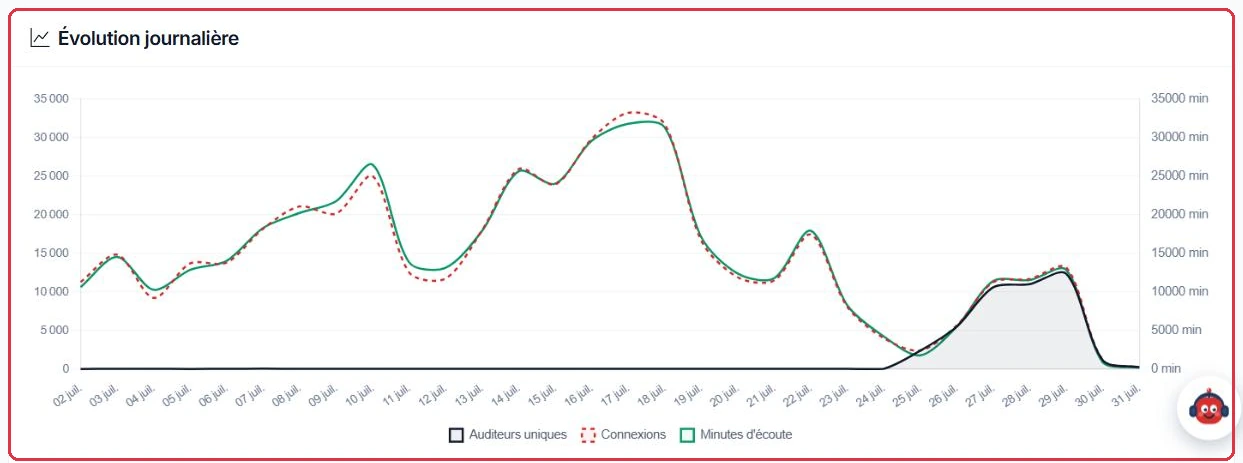
Daily trend — the day-by-day evolution.
Hourly distribution — the breakdown across 24 hours, in server time (UTC): add your timezone offset (for example +1 h or +2 h in the UK depending on the season) to read your audience peaks in local time.
Day-of-week distribution — your best-performing days.
The daily trend: unique listeners, connections, and listening minutes overlaid. Click to enlarge
Geolocation and devices
Geolocation
An interactive "World Map" (with zoom and mouse or touch panning), accompanied by a "Top countries" list (up to 30 countries), shows where your listeners are coming from: countries are drawn in slate grey and each red dot marks a city where your station was listened to during the selected period.
Above the map, region buttons appear only for areas where listeners have actually been recorded: "World", "Caribbean", "Indian Ocean", "South Pacific", "Polynesia". Clicking one recentres the map on that region, and your selection is retained when you change the period.
Small islands (Martinique, Guadeloupe, Réunion, etc.) are not drawn on this base map: the red dots are what mark your listeners there.
On the dashboard, the "Listener map" combines two layers: green for listeners connected right now, and red for those from the "Last 24 hours". Click a legend badge to hide or show a layer.
Listening devices
The device breakdown distinguishes: PC, Smartphone, Tablet, TV, Smart speaker, Script, and Unknown.
Exporting
The "Export PDF" button generates a branded report in your image, convenient to share with a partner or advertiser.
Tip:
Cross-reference the hourly distribution with your programming schedule: place your best content in the time slots where your audience is at its strongest.
The "Export PDF" button, active once the data has loaded. Click to enlarge