Order a station imaging package produced by a studio
What is "Jingle Radio" for?
"Jingle Radio" allows you to order a professional station imaging package: spoken jingles, liners, top-of-hour IDs, medleys, and voice-overs. The page describes it as follows: "Professional station imaging produced by our studio, delivered within 48 working hours."
You describe what you want, you pay, and a studio handles the production. You then retrieve the audio files from your account.
The page is located at /dashboard/jingles-studio. You can access it via the "Jingle Radio" button in the services bar at the top of your dashboards, or via the "Jingle Radio" card on the home screen.
Good to know:
The services bar only appears if at least two services are active on your account. This page remains accessible even without an active radio hosting subscription.
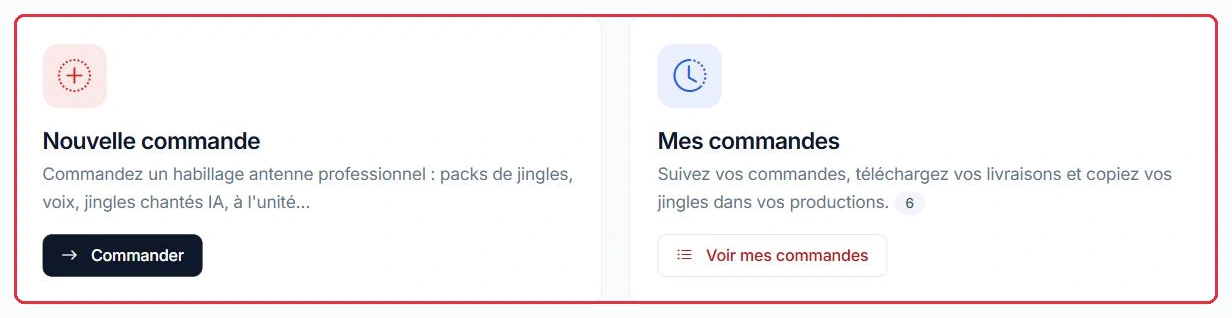
The two cards: place a new order, or track your existing orders Click to enlarge
AI Jingles vs. "Jingle Radio": two different things
Do not confuse the two ways of obtaining a jingle on the platform:
"Production › Jingles": you generate a jingle yourself using AI, in a matter of seconds. This uses your AI credits. This process is described in /guide/jingles.
"Jingle Radio" (this page): production is carried out by a human provider, based on your brief, and delivered as audio files. It is paid for in euros, by credit card or bank transfer, and does not affect your credit balance.
In practical terms: AI is instant and inexpensive, while the studio takes longer but delivers a bespoke imaging package with real voice actors.
Good to know:
One exception worth noting: the "Pack 10 AI Sung Jingles" does appear in this catalogue and is paid for in euros like the other packages, not in credits, even though it relies on music generation.
The catalogue: packages
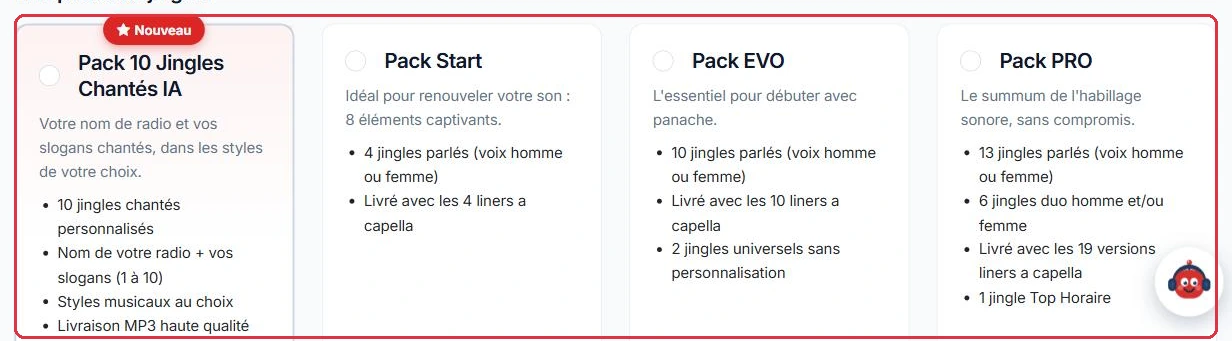
At the "Package" step, the "Jingle Packages" tab presents four options. The prices below are full prices: during a promotional campaign, a banner announces it at the top of the tab — currently "Back-to-school offer: -10% on all packages until 30/09" — and "The discount has already been applied to the prices below", with the full price shown crossed out. The discount applies only to packages, not to individual jingles or add-ons.
"Pack 10 AI Sung Jingles" — €35, labelled "New". Your radio name and slogans sung: 10 personalised sung jingles, choice of musical styles, delivered as high-quality MP3s.
"Start Pack" — €99. 4 spoken jingles (male or female voice), delivered with the 4 a cappella liners. Premium voice add-on: +€25.
"EVO Pack" — €199. 10 spoken jingles, the 10 a cappella liners, plus 2 universal jingles without personalisation. Premium voice add-on: +€60.
"PRO Pack" — €440. 13 spoken jingles, 6 male and/or female duo jingles, the 19 liner versions a cappella, and 1 Top-of-Hour jingle. Premium voice add-on: +€100.
A "No package (individual items only)" option is selected by default: it lets you build your order entirely à la carte.
Example
Three situations, three packages.
Ambiance FM is launching its station from scratch: "EVO Pack" at €199 — 10 spoken jingles, the 10 a cappella liners, and 2 universal jingles, enough to dress a full broadcast day.
Radio Soleil already has imaging but it is outdated: "Start Pack" at €99 — 4 jingles and their 4 liners are enough to refresh the sound.
Studio Nova wants a complete imaging package with top-of-hour IDs and voice duos: "PRO Pack" at €440 — 13 spoken jingles, 6 duos, 19 liners, and 1 Top-of-Hour jingle.
Why: a cappella liners are included with the packages. They are what allow you to place your radio name over music without cutting the sound.
The four steps of the order process Click to enlarge The jingle packages and their detailed contents Click to enlarge
The catalogue: individual jingles
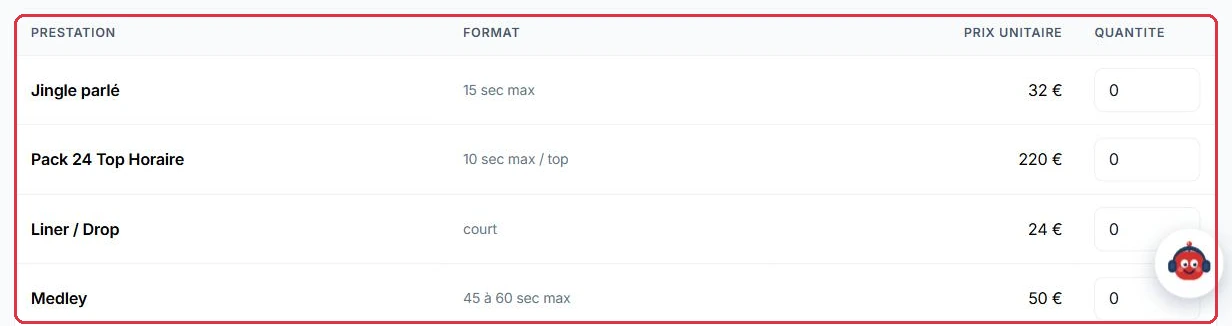
The "Individual items" tab displays a table with the columns "Service", "Format", "Unit price", and "Quantity". Simply enter a quantity next to the items you want:
"Spoken jingle" — max 15 sec — €32.
"Pack of 24 Top-of-Hour IDs" — max 10 sec per ID — €220.
"Liner / Drop" — short format — €24.
"Medley" — max 45 to 60 sec — €50.
"Self-promo and Ad" — max 30 to 40 sec — €50.
"Voice-over" — max 30 sec — €24.
Packages and individual items can be combined: the total updates in real time at the bottom of the page.
Good to know:
As long as the total is zero, the wizard will not proceed and displays "Please choose a package or at least one individual jingle to continue."
Example
Do the maths before deciding: four spoken jingles ordered individually cost more than the package that includes them.
Individually: 4 x "Spoken jingle" at €32 = €128, and without the liners.
As a package: "Start Pack" at €99 = the same 4 spoken jingles, plus the 4 a cappella liners.
Individual items remain the right choice for a one-off need: a single "Voice-over" at €24 for a welcome message, or a "Medley" at €50 for a one-time campaign.
Why: from three or four items onwards, a package becomes better value and more consistent — everything is produced in the same session, with the same voice.
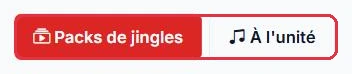
Switching between "Jingle Packages" and "Individual items" Click to enlarge Individual pricing, service by service, with quantity Click to enlarge
Choosing a voice
The "Voice" step offers four voice actors:
"Marc" — Male, included (selected by default).
"Marion" — Female, included.
"Lucille" — Female, premium.
"Antoine" — Male, premium.
Premium voices add a surcharge that depends on the package chosen: +€25 with the "Start Pack", +€60 with the "EVO Pack", +€100 with the "PRO Pack".
Good to know:
The premium voice surcharge only applies when a package is included. An order consisting solely of individual jingles does not trigger this surcharge. And if you choose the "Pack 10 AI Sung Jingles", the "Voice" step is automatically skipped: this package is sung.
Example
Studio Nova wants the "Lucille" premium voice. The surcharge depends entirely on what is in the basket.
"Start Pack" €99 + Lucille (+€25) = €124.
"EVO Pack" €199 + Lucille (+€60) = €259.
Two "Spoken jingles" only, i.e. €64, with Lucille = €64: without a package, no surcharge is applied.
Why: listen to the voices and choose before locking in your package, not the other way around. The same voice actor does not cost the same depending on the option — and this voice will carry your station for months.
The available voices; premium voices add a surcharge Click to enlarge
The brief, step by step
The order is placed through a four-step wizard: "Package", "Voice", "Details", "Payment", with "Previous" and "Next" buttons.
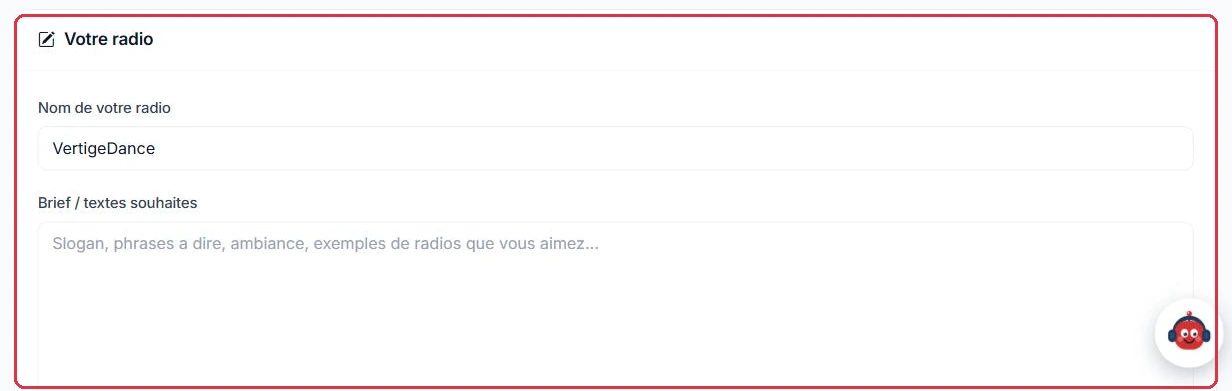
At the "Details" step, the "Your radio" block contains:
the "Your radio name" field, pre-filled with your station name;
the "Brief / desired texts" field: slogan, phrases to be spoken, atmosphere, examples of stations you like.
If you have chosen the "Pack 10 AI Sung Jingles", an additional block appears:
"Your slogans" — from 1 to 10 slogans, 190 characters each, added using the "Add a slogan" button.
"Music styles" — to be selected from Pop, Rock, Dance / Electronic, Hip-Hop / RnB, Funk / Disco, Chill / Lounge, Latino, Country / Folk.
The "Slogan ideas" button generates suggestions based on your radio name, the selected styles, and your brief. Click on a suggestion to add it to your list, or click "Regenerate" to get new ones. This writing aid uses no credits.
Good to know:
For the sung package, the order is blocked until you have entered your radio name, at least one slogan, and at least one music style. The message "Sung Jingles Pack: please enter your radio name, at least one slogan, and one music style." will bring you back to the "Details" step.
Example
The "Brief / desired texts" field is the only place where you communicate directly with the studio. Compare the two versions below.
Too vague: "Make us something dynamic for our radio."
Workable brief: "Radio Soleil, a pop webradio spanning the 80s to today, listened to mainly in the car in the morning. Slogan to be spoken on all jingles: 'Radio Soleil, the music that wakes you up'. Warm and upbeat atmosphere, never aggressive. Calm male voice, with a smile in the delivery. Two short jingles for musical transitions, two longer ones to open the morning show."
Why: the studio knows neither your station nor your habits. With the first brief, they guess and you are disappointed; with the second, the delivery within 48 working hours is ready to use as-is, with no back-and-forth.
The brief: radio name, desired texts, atmosphere, and references Click to enlarge
Paying for your order
At the "Payment" step, a summary details each line item and the total, then you choose your "Payment method":
"Credit card (immediate payment)" — you are redirected to the secure payment page.
"Bank transfer (bank details sent by email)" — the order is recorded and you receive the bank details. They are also shown in the order details ("Awaiting your transfer", "Beneficiary", "IBAN", "BIC", "Amount") with the note "Please make the transfer quoting the reference: …".
Upon returning from a card payment, the page displays "Thank you! Your payment has been successfully processed. Production is now underway." or, if you abandoned the process, "Payment abandoned. You can complete it whenever you are ready."
With the sung package only, an additional option appears on this screen: "Producer supervision" at +€9, described as: "A producer supervises and validates the production of your jingles before delivery." The "Order" button confirms the entire order.
Good to know:
For bank transfers, always include the order reference in the payment description. Production only begins upon receipt of the transfer, whereas it starts immediately with a card payment.
The total updates with each selection, at the bottom of the wizard Click to enlarge
Tracking your order and retrieving your files
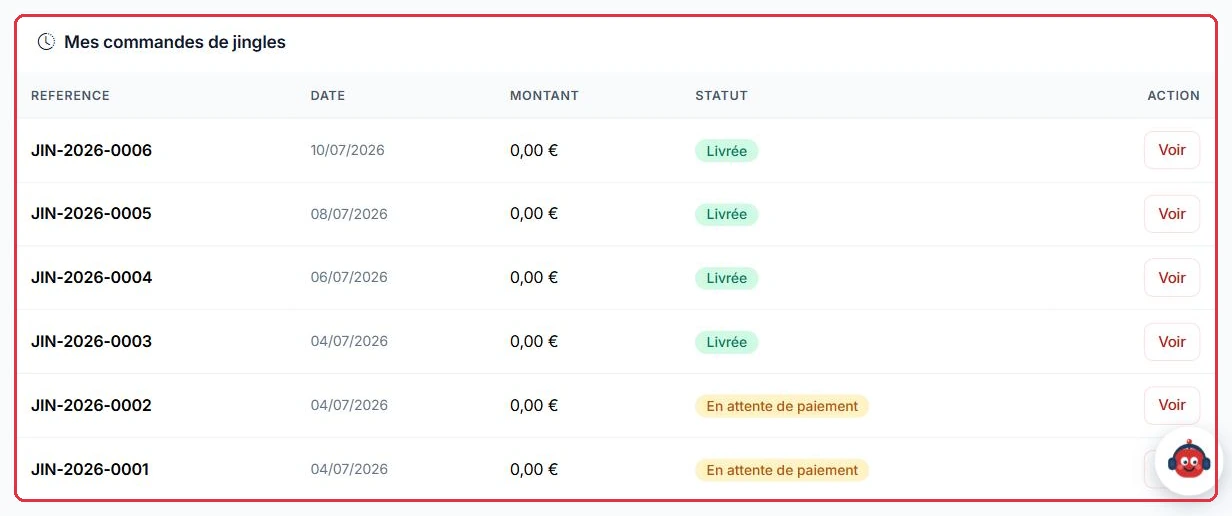
The service home page offers two options: "New order" and "My orders". The "My jingle orders" table lists the "Reference", "Date", "Amount", and "Status", with a "View" button for the details.
Five statuses mark the progress of an order:
"Awaiting payment" — nothing has been started. The order details show "Payment has not yet been finalised." and offer the "Pay €X by card" button to complete an abandoned card payment — or to pay by card an order originally intended for bank transfer.
"Paid" then "In production" — the message "Your imaging package is in production. You will be notified by email upon delivery." is displayed.
"Delivered" — the files are available.
"Cancelled".
Delivery takes place within 48 working hours: from the moment card payment is confirmed, or from the moment the bank transfer is received.
Good to know:
The amount of an order may be adjusted by our team following a discussion with you (goodwill gesture, added service). You will then receive a payment link by email that opens your client area: the payment page is generated at the moment you click, with the updated amount, avoiding any expired links. An already-paid order displays "This order has already been paid."; an order totalling €0 has nothing to pay.
Once the order is delivered, the "Your jingles" tab opens first in the order details. You can:
listen to each file before downloading it;
download an individual file, or retrieve everything at once with "Download archive (ZIP)";
use the "Copy to my jingle productions" block: choose an "Existing category" or enter a "new category", then click "Copy to my productions".
Tip:
Always copy your jingles to your productions: this is what allows you to schedule them directly on your radio, without having to download them and then import them manually.
Example
Your order moves to "Delivered". The right reflex is not to download the ZIP to your computer.
"Your jingles" tab→Listen to each file→New category "Morning show imaging"→"Copy to my productions"
The files then join your jingle productions, where the playlist editor and scheduling tools will find them.
Why: a downloaded ZIP stays on your hard drive. Copied to your productions, the imaging package is ready to broadcast straight away, with no manual re-import.
Your orders: reference, date, amount, and status Click to enlarge